WikiCamps vs AussieCamps: both help you find somewhere to camp around Australia, but they feel very different to use. AussieCamps is free to download, shows no ads and has no login, while WikiCamps is a paid app that shows ads and needs an account. We make AussieCamps, so here is what you get by switching, one topic at a time. To compare for yourself, get AussieCamps for iPhone; it is free to download and asks for no account before you search.
WikiCamps vs AussieCamps at a glance
The short version: AussieCamps asks nothing of you before you start, and it makes planning with someone else easy.
| WikiCamps | AussieCamps | |
|---|---|---|
| To get started | A$9.99 | Free to download, with in-app purchases |
| Ads | Yes | None |
| Account and login | Required, with an email code | None |
| Where places come from | Mostly added by users | Park agencies and road authorities |
| Plan with a partner | Trip links | Live shared trips through iCloud, plus a web link anyone can open |
| Trips without signal | Up to three | All your saved trips and places |
| Sync | Through your WikiCamps account | Through iCloud, no account |
- No login, no ads
- Live trips with a partner
- Free to download
Login and ads
WikiCamps needs an account, and you sign in with a code sent to your email. Plenty of users find themselves signed out at the worst moment, out of range at camp. It also shows ads, even after you've paid for it.
AussieCamps has neither. There's no account, no code and nothing that can log you out, and you'll never see an ad.
- No account, no logouts
- No ads
- Free to download
Ease of use
Lots of WikiCamps users say the new version is harder to find your way around. AussieCamps keeps it to a few taps. The app opens on the map. Tap Filters, choose what you need, then tap a place to see its fees, facilities and conditions. Add it to your trip from the same page.
There's no sign-in screen, no pop-up and no ad between you and the map.
- Opens on the map
- Filter, tap, add
- Nothing in the way
Filters for dogs, 4WD and free stops
Some WikiCamps users miss the filters they used to rely on, such as 4WD-only access and dogs. In AussieCamps, Dogs allowed and 4WD access have their own Pets and access section in the filters, and both show on each place's page too.
Add features such as Toilets, Drinking Water, Showers, Caravan Sites or Campfires Allowed, and a place has to have all of them to stay on the map. The Free filter shows free rest areas, water points, dump points and toilets, which is handy for breaking up a long drive.
- Pets and access filters
- Combine filters to match all
- Free rest areas and stops
Trip planning
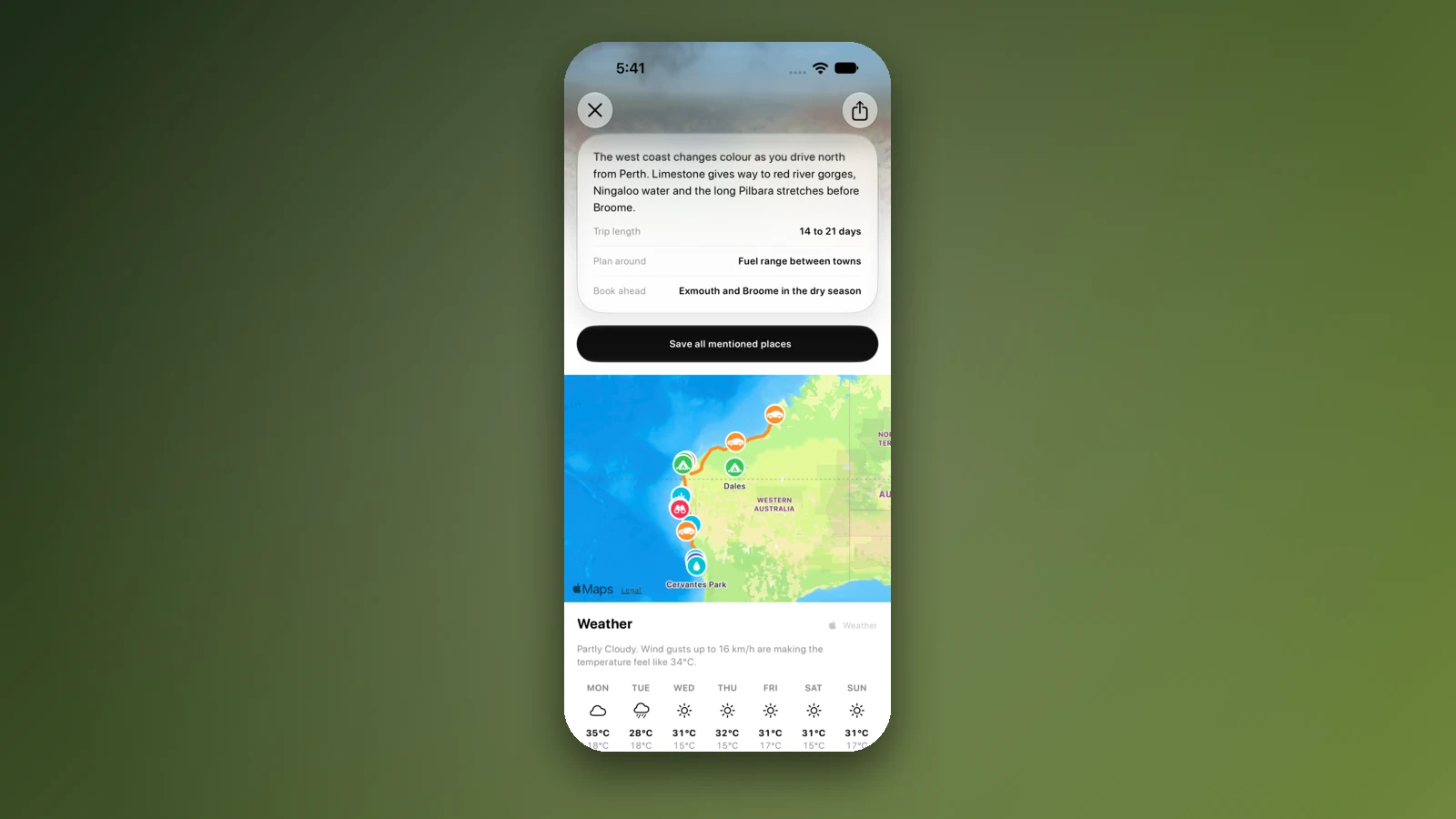
In AussieCamps, set your home once in the You tab, then start and finish any trip at Home with one tap. Tap Add stop to search places in the app, any address, your current location or your saved pins, or drop a pin on the map and tap Add to trip.
Put the stops in driving order and every leg tells you how far it is and how long it takes. Add arrival dates, notes and a to-do list, see the weather for each stop, and tick stops off as you go. You can sync the trip to your calendar too.
- Start and finish at Home
- Any address or pin as a stop
- Distance and drive time for every leg
Sharing with your partner
Share a trip in AussieCamps and choose Collaborate to invite your partner through iCloud. You can both add, reorder and tick off stops and edit notes, and the changes appear within seconds. It uses the iCloud already on your iPhones, so neither of you signs up for anything.
For everyone else there's Send copy, a link that opens the trip in any web browser, and Share as image, a picture of the route with its stops, dates and nights. Shared places open straight in the app for anyone who has it.
- Collaborate live through iCloud
- Send copy opens in any browser
- Share the trip as an image
Without signal
WikiCamps keeps up to three planned trips available offline. In AussieCamps, place details, your saved places and all your trips work without signal, with no download step, so you can check the next campground's fees and facilities in a dead zone.
- All your trips without signal
- Place details on your phone
- No download step
Where the places come from
Most WikiCamps listings are added by its users. AussieCamps starts from what park agencies and road authorities publish, so fees, facilities and rules come from the people who run the site.
WikiCamps is owned by G'day Group, the company behind Discovery Parks and G'day Parks. AussieCamps is independent and shows free rest areas and national parks right next to paid parks.
- Official park and road data
- Independent
- Free stops next to paid parks
Why switchers pick AussieCamps
They want to open a camping app and see the map, with no login and no ads. They want filters that find a dog-friendly or 4WD camp in one tap. And they want to plan the trip together, live, from two iPhones.
AussieCamps is free to download, so try it on your next trip and see how it feels.
- No login, no ads
- Filters that find the right camp
- Plan together, live
Places along the way
Common questions
Is AussieCamps better than WikiCamps?+
For campers who want no login, no ads and a simple map, yes. AussieCamps is free to download and lets you plan trips live with a partner without an account.
Does AussieCamps need an account?+
No. There is no login of any kind. Your saved places, collections and trips sync through the iCloud already on your iPhones.
Does AussieCamps have ads?+
No. AussieCamps never shows ads. It is free to download, with in-app purchases.
Can my partner and I plan the same trip in AussieCamps?+
Yes. Share the trip and choose Collaborate. You both add, reorder and tick off stops, and changes show up within seconds.
Can I add my own spots to an AussieCamps trip?+
Yes. Add stop finds places in the app, any address, your saved pins, your current location and Home, so any favourite spot can go in your trip.
Take it on the road
Save the stops. Plan the whole trip.
Build an ordered route from saved places, calculate the distance and keep dates, notes and to-dos attached.